
Overview
- Get an in-depth understanding of the Catalogs List Page
- Search for different Catalogs you have created
- Edit the Catalogs that have been previously created
- Create New catalogs
- Catalogs are one of the first items users see when they login, as it leads to purchasing a course
If you would like to learn how to Create a Course please click the link!
What is Covered
- Getting to the Catalogs List
- Breakdown of the Catalogs List Page
- What can you do with the Catalog Page?
Getting to the Catalog List
Go to Menu---> Storefront & Commerce---> Catalogs
Breakdown of the Catalogs List page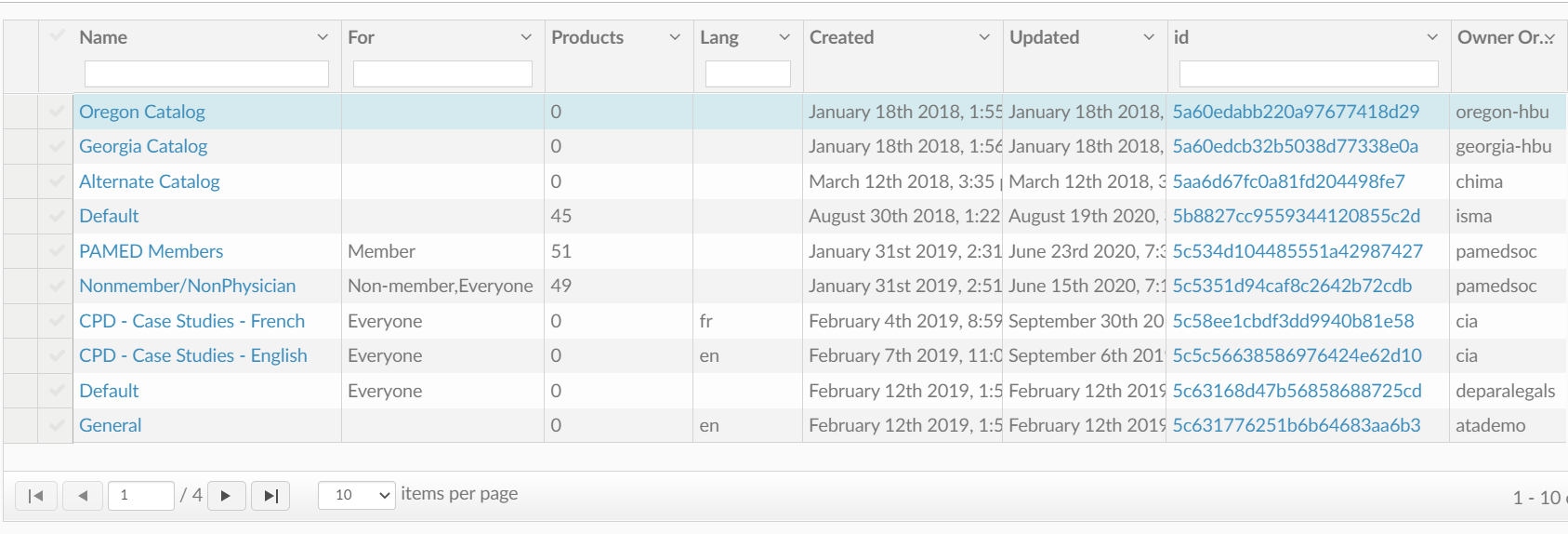
What you will see on this page:
- Name- Catalog Name
- For- If it is for members, no-members, or everyone
- Products- How many products are in the catalog
- Lang- What language the Catalog is in
- Created- Date it was created
- Updated- Date it was last updated
- ID- Products Unique Creation ID
- Owner- Who made the Catalog
What can you do on this page?
On the Catalogs List page, you can see all of the Catalogs that have been made. Clicking on the catalog name or the ID will take you to edit the catalog.
In the top right-hand corner you can create click Add New to create a new catalog.