
Overview
- Learn how to create a discount
- Learn how discounts are applied
- Discounts are useful if you want to encourage the purchase of a certain product
- You can also use discounts to promote sponsors.
- If the user purchases something from a sponsor or visits their website you can present them with a coupon code to use at checkout.
- Use discounts to promote courses, sponsors, or even other websites!
If you would like to know about Sponsors or building a Course, please click the links!
What is Covered
- Creating a Discount
- Applying a Discount
Creating A Discount
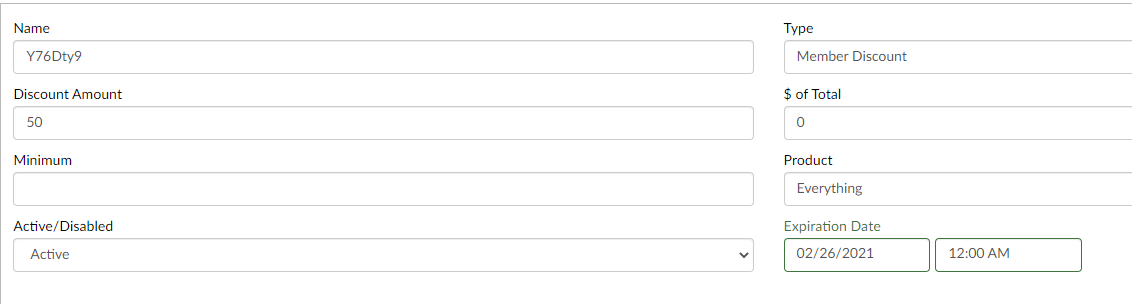
- Go to Menu---> Storefront & Commerce---> Discount Setup
- In the top right-hand corner, select Add New
- Fill in the Necessary Information
- Name
- This is the name that users will type in to get their discount
- Type
- What type of discount is it? Useful to put Member/ Non-Member or New Student just to differentiate the discounts you make.
- Discount Amount
- How much the discount will be
- $ of Total- not necessary to input
- Minimum
- The least a user must purchase to be able to use the discount
- Product
- What product the discount is for (does not place restrictions but useful for your future reference).
- Active/ Disabled
- If active will be useable
- If disabled users will not be able to use it
- Expiration Date
- When the users will no longer be able to apply the discount (can always be extended).
- Name
- Select Save
And you have now created a discount!
Next, let's learn how to apply a discount
Applying a Discount
- Go to your catalog
- Ge there by clicking on your profile picture
- Select My Courses
- Below you will find courses you can purchase
- You can also select Course Catalog in the top right-hand corner
- Select the items you want to purchases
- Select Checkout
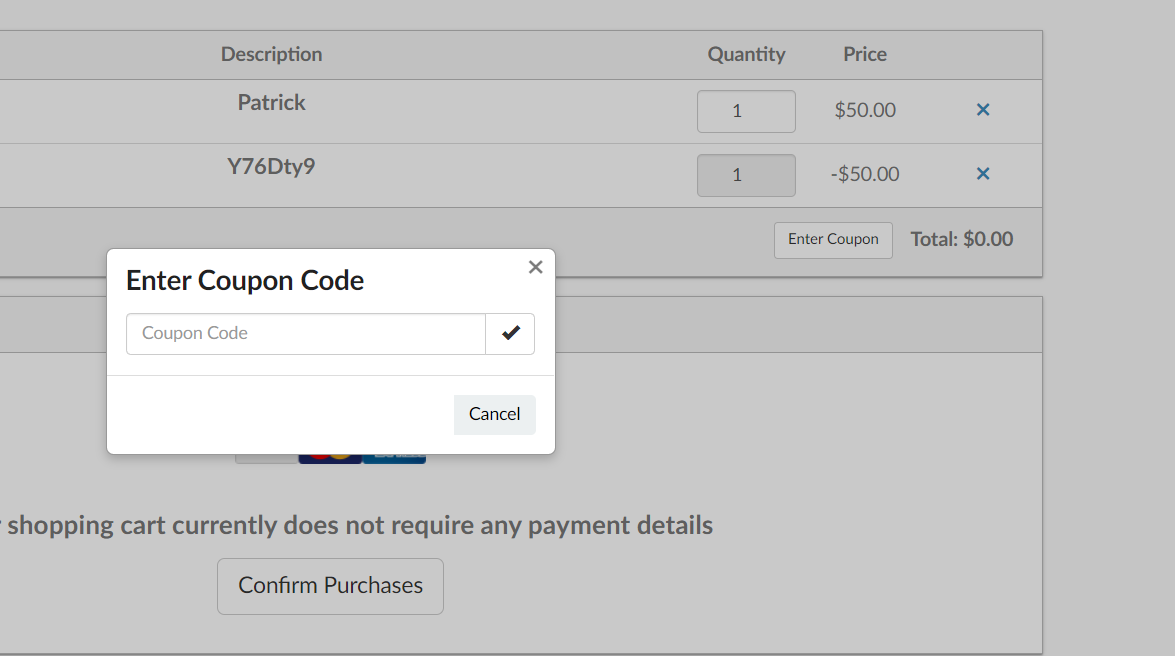
- Next, the page above will show up
- Click the Enter Coupon button just below your items set for purchase
- Type in the Coupon Name/ Code
- Click the checkmark
- If the name is right Use Code will appear
- If the name is wrong, just below it will say Invalid Coupon
- If the name is correct select Use Code and you will see it populate and apply the discount
You can now check out with your discount applied!
Enjoy the discounts!