Overview
- Learn to create Matrix Questions
- Matrix questions are very useful for surveys but can also be used in Assessments
- Use different question types to add variety to your surveys or assessments
- Surveys are a very easy way to get feedback on a course!
If you want to know about Question Types or Creating an Assessment, please click the link!
What is Covered
- How to Create a Matrix Question
Video Walkthrough
(Video not working?--->https://youtu.be/m37rwZH2xWE)
Text Overview
- Open the Menu ---> Learning Content--->Questions
- In the top right-hand corner select the + Add New button
- Change the question type to Matrix Questions
- Add a Name
- Choose the Display type (Default or Alternate)
- Type in the Question
- Enable User Feedback- allow the user to comment on the question
- Fill in Feedback (Optional)
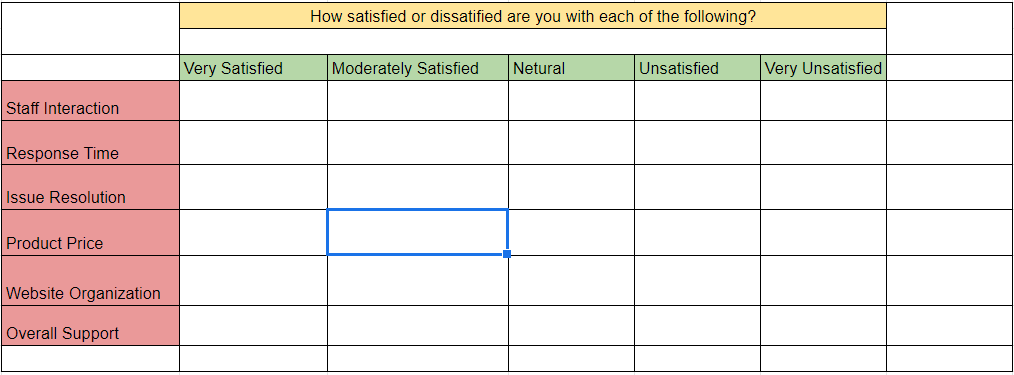
- Create your matrix
- In the columns, place all you answer choices
- In step 8.1 take a look at the green row. Each answer is in its own column.
- In the rows, place all your questions/statements
- In step 8.1 take a look at the red column. Each Question/ Statement is placed in a row.
- Once you have everything filled out select Save and Preview your question
- Make any necessary changes and save again
- You can Save & Close and there you have a Matrix question!