
Overview
- Adjust what users can do on their profile
- Turn off profile pictures
- Control if they get to change their profile information or if only admins can do it
- Give the user access to a calendar
Want to learn more about the Configuration & Tools Section? Click the link to learn more!
What is Covered?
- Getting to User Profile Control Settings
- Using the User Profile Control setting under the settings tab
Getting to the Control Settings
Go to Menu---> Configuration & Tools---> Settings---> User Profile Control Settings
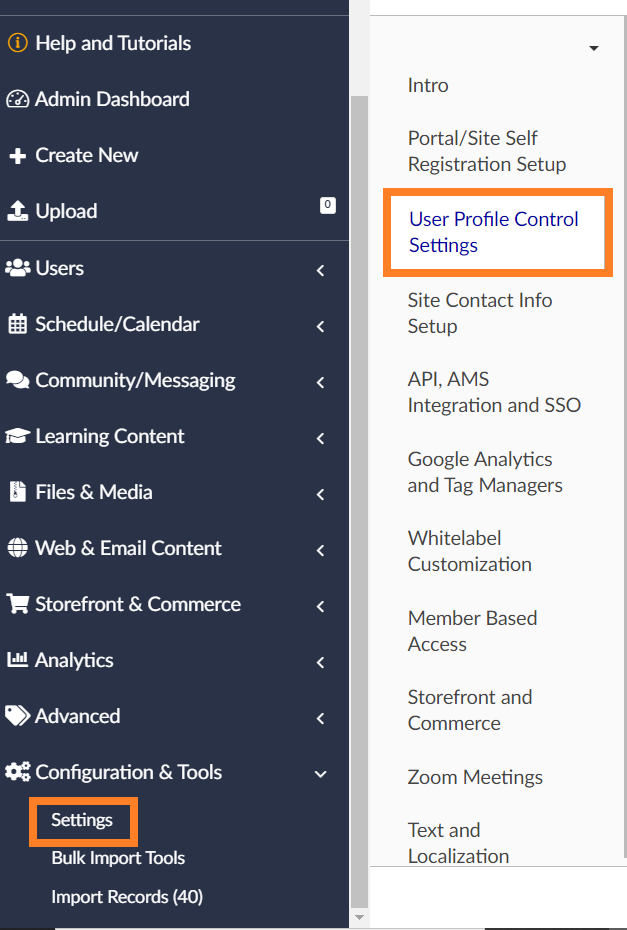
Using the User Profile Control Settings
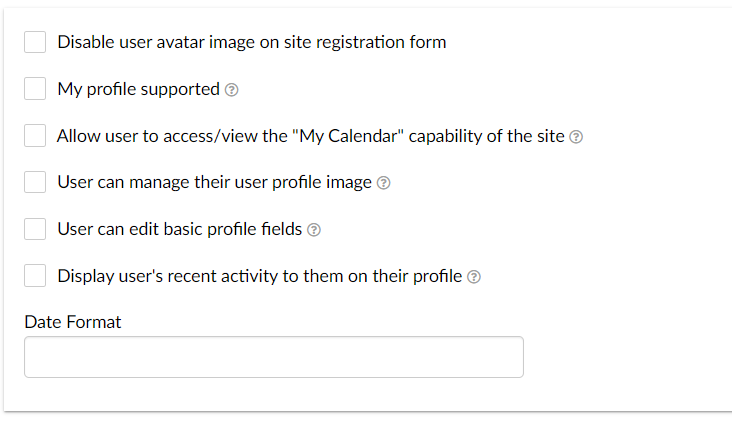
- Disable User avatar image on-site registration form
- Determines if users have a profile image
- My profile supported
- Controls the display of the 'My Profile' navigation link on the user profile drop-down menu.
- Allow user to access/view the "My Calendar" capability of the site
- In the dropdown menu next to the user profile picture you can choose to display or not display the calendar.
- User can manage their user profile image
- Can users change their profile pictures?
- User can edit basic profile information
- Toggle whether users can change their profile information
- Display user's recent activity to them on their profile
- Toggle whether the user can see their recent activity.
- Date Format
- Change the date format
You now know how to use the User Profile Control Settings tab! Please be sure to view our other help content!