
Overview
- See everything that has happened on your site
- Make it simple to find issues that may have arisen
- Can help you confirm that someone has completed something if it isn't showing in the course
- Give you full transparency and understanding of what is happening in on your site
What to know more about the Analytics section? Click the Link!
What is Covered
- Breakdown of System Events List
System Events List Breakdown
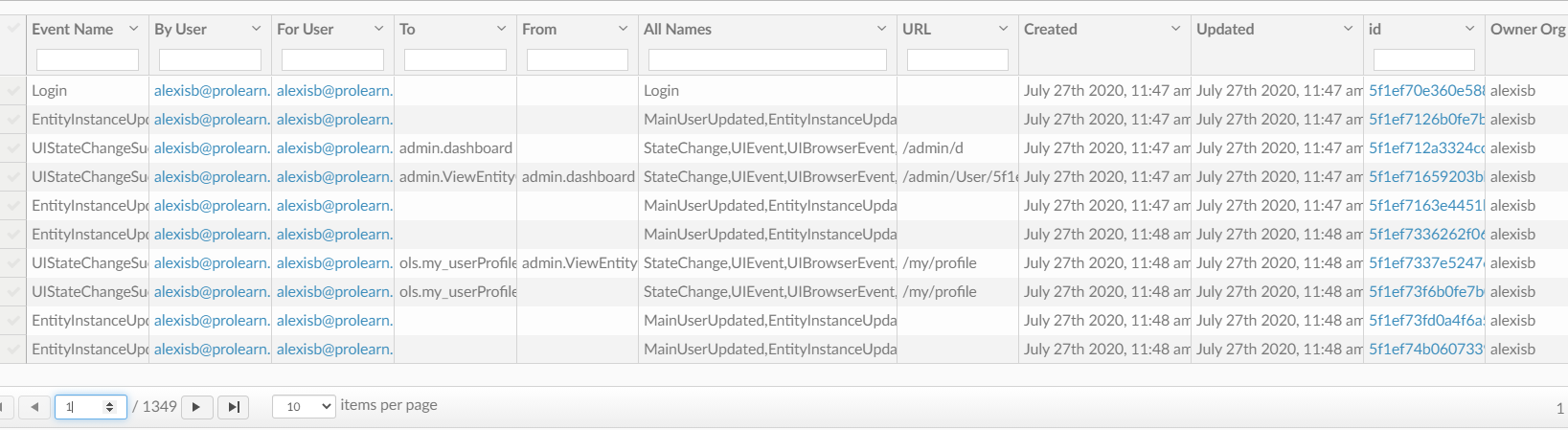
What you will see:
- Event Name
- What happened in the system
- By User
- Who did the action
- For User
- What user the action affected
- To
- What page was navigated to
- From
- What page was navigated from
- All Names
- Gives the user and what was done
- URL
- Give you the page URL that the system event took place
- Created
- When the event happened (was created)
- Updated
- When the event was last updated (usually the same as when it was created, System event cannot be edited)
- ID
- Events unique ID code
- Owner
- Who created/ Caused the System Event
Now you know about the System Events List!
Have fun creating!