
Overview
- Setup Reminder for Scheduled Events
- Linked user will get an email about Events they are registered for
- Create Multiple reminders for one event so they can get one when there is a week or a day left before the event!
- A simple way to ensure no one misses mandatory learning!
If you would like to know about Understanding the Schedule/ Calendar Section, please click the links!
What is Covered
- Finding the Reminder Templates Page
- Link a pre-existing template
- Create a reminder Template
- Reminder Template fields explanation
- Extra Information
- Useful Links
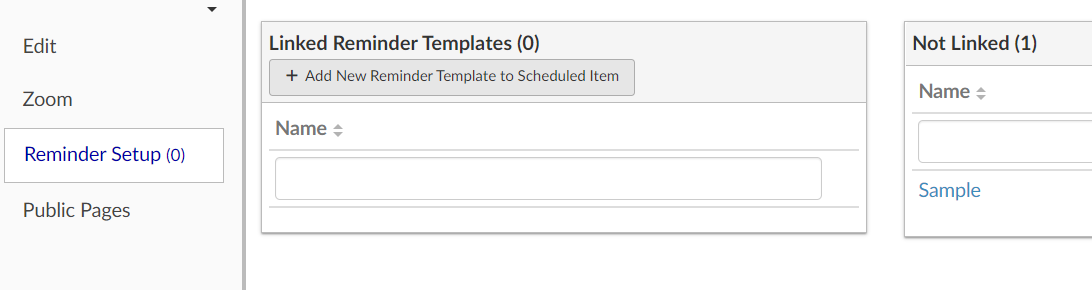
Finding the Reminder Template
Go to Menu--->Schedule/ Calendar---> Reminder Template
Link Pre-existing template
To link an already created template you will click the square plus button on the right-hand side of the Not Linked box.
Creating a Reminder Template
To create a reminder template that you can add to a scheduled item, in the Linked Reminder Template box, select +Add New Reminder Template To Scheduled Item
Enter a name for the Reminder Template and press Save
Next, the page below will appear.
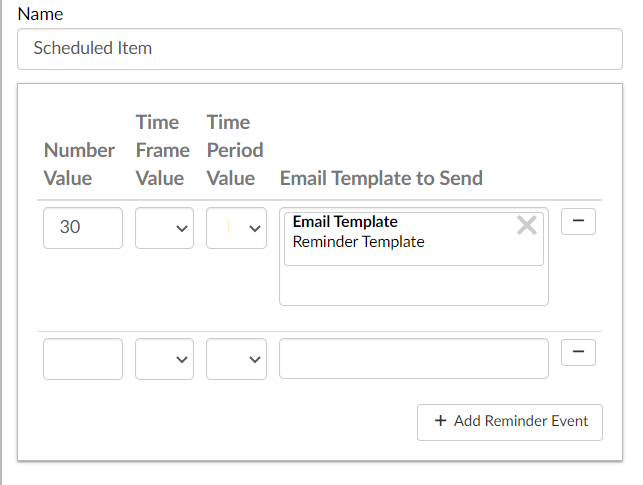
Here is an explanation of the fields above:
- Number Value (12 (days), 30 (mins), 1 (hour))
- This will define the time frame value.
- Time Frame Value (seconds, minutes, hours, days, and months)
- This gives units to the number value field
- Time Period Value (before, after)
- If the time is set to 30 mins before, the reminder will be sent 30 minutes before the Scheduled Item.
- If the time is set to 30 mins after, the reminder will be sent 30 minutes after the Scheduled Item.
- Email Template to Send
- Reminder Templates use email templates
- When you press the box a list of all your email templates will show up.
- Select the one you would like to use in your reminder.
Extra Information
You can add multiple reminders for a Reminder Template. You could put a week out (7 days), then one day, and then 30 minutes so users get 3 reminders altogether.
On the right-hand side of the page, there is a box that says Linked Scheduled Items. Here you can link Events on the Calendar to your reminder templates
Once you are done creating be sure to press the SAVE button!